Sign in with your own browser
For sites with single sign-on or one-time codes, itda login --browser opens a fresh window. You sign in by hand; itda keeps only that site's session in the keyring.

Give itda one address. It learns what the site can do and tries it. Your AI agent gets a short list of actions in plain words. Reads just work. Nothing changes on the site until you say yes. Even the old intranet behind a login.
For the sites your company runs and the services you have an account on, not the web at large.
curl -LsSf https://github.com/brnyxx/itda-cli/releases/latest/download/itda-cli-installer.sh | sh
irm https://github.com/brnyxx/itda-cli/releases/latest/download/itda-cli-installer.ps1 | iex
Download macOS (Apple silicon), macOS (Intel) or Windows and open the file. Claude Desktop installs itda and its tools.
cargo install --git https://github.com/brnyxx/itda-cli itda-cli
then itda the-site-you-use.example

itda 0.7.0
One Rust binary. macOS, Linux, Windows. Apache-2.0. No account, server or telemetry.
$ itda news.ycombinator.com
1/5  Looking at news.ycombinator.com...
    The page opens without signing in.
    Found: a list of 30 records, a form, a feed.
2/5  What agents will be able to do:
    read   home         List what Hacker News shows  (inputs: p)
    read   feed         Read the RSS feed
3/5  Trying every read once...
    ✓ home         30 records
    ✓ feed         ok
4/5  Saved as 'news-ycombinator'.
    Connect Claude Desktop? [Y/n]
5/5  Adding itda to Claude Desktop...
Added itda to Claude Desktop (~/Library/Application Support/Claude/claude_desktop_config.json).
Open Claude Desktop and itda will be there.
Done. Ask your agent for something on 'news-ycombinator', for example "use news-ycombinator to list what Hacker News shows".
Connecting Claude Desktop...
Done · 5/5[ 00 ] Skip the terminal
Paste it into Claude Code, Cursor or Codex with the address of a site you use. The agent installs itda. It sets up and starts using the site. You only say yes to changes.
Install itda and set up the-site-you-use.example for me.
1. Install it: curl -LsSf https://github.com/brnyxx/itda-cli/releases/latest/download/itda-cli-installer.sh | sh
   (on Windows: irm https://github.com/brnyxx/itda-cli/releases/latest/download/itda-cli-installer.ps1 | iex)
2. Run: itda setup https://the-site-you-use.example --client claude-code -y
   (use cursor, codex or claude-desktop if that is what you are)
3. Read https://github.com/brnyxx/itda-cli/blob/main/AGENTS.md, then use the site through itda.
   Reads just work. Anything that changes the site waits for my approval.
   If a read says to sign in, tell me to run: itda login <site> --browser
[ 01 ] How it works
itda looks at the page. If the site needs a sign-in, it opens your own browser. It watches you use it. It never clicks or types. itda names each thing the site can do and tries every read once. It keeps what works and connects your agent.
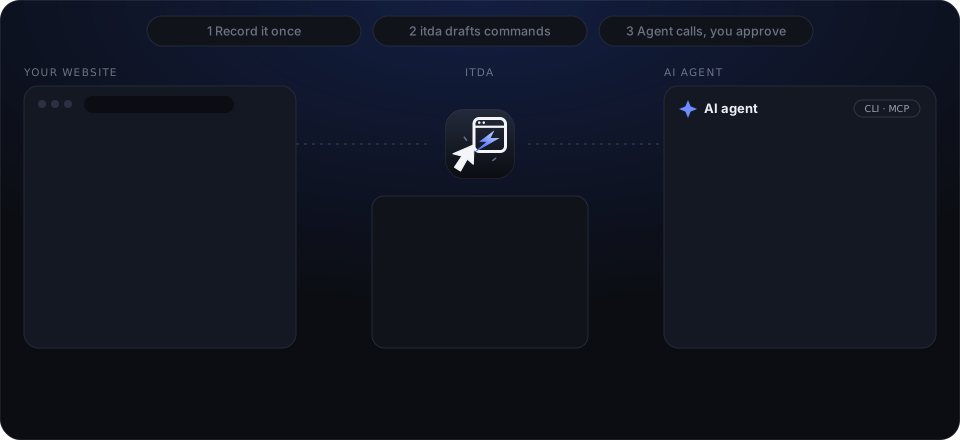
Paste the address of a site you use. itda reads public pages as is. Sites behind a login open in your own browser; you sign in and use them as usual while itda watches. What you type never leaves your computer.
itda setup https://board.example
itda lists what your agent will be able to do, in plain words: "List what Notices shows", "Search on Notices", "Submit the form on Notices (waits for your approval)". It tries every read once and drops what does not work.
read get-board List what Notices shows
Pick Claude, Cursor, VS Code or Codex and itda connects itself. From then on you just ask: "find this week's notices". Reads happen right away; a change stops and waits until you say yes to exactly that one.
"use board to find this week's notices"
[ 02 ] Built for the real web
For sites with single sign-on or one-time codes, itda login --browser opens a fresh window. You sign in by hand; itda keeps only that site's session in the keyring.
Server-rendered tables become records, and forms that want a one-time CSRF token get it from a preflight step right before each approved post. The agent never sees it.
itda check runs every read that needs no input. It tells you which ones no longer match, before an agent runs into them. Run it on a schedule.
[ 03 ] What it can and cannot do
For the sites your company runs and the services you have an account on. Every line here is true of the code today.
__NEXT_DATA__, ld+json)itda record watches you use it and drafts from the calls it saw.
The full list, with what each line means, is in the README.
[ 04 ] When the site changes
A browser agent adapts on every run, and is slow and nondeterministic for it. itda is one request and the same answer every time. It breaks loudly when the site moves.
itda check runs every read needing no input and never sends a change. It ends with one verdict: ok, signed_out, site_changed, blocked or unreachable. Exit code 11 means the site changed. Run it on a schedule.
itda check board
itda refresh drafts the site again from what it was set up from: its pages, the API description, the GraphQL endpoint, or the kept shape of the recording with every value blanked.
itda refresh board
It shows what would change per action and writes nothing until you say yes. itda keeps what you edited by hand. It tries a new action once before adding it and checks the site again right after.
Write these changes to 'board'? [y/N]
[ 05 ] The same site, two agents
Reads whole pages. Types where the model decides; retries when blocked.
One answer per action. Every change waits for you; a read refused in the browser too fails and says so.
Playwright MCP, browser-use and computer use drive a browser on every task. itda does not replace them: a page you will use once, or a site itda does not cover, is theirs. itda is for the site an agent will call again and again. Record it once in a browser, review the actions, then run them over HTTP. Use both: a browser agent to explore, itda for the calls that run every day.
[ 06 ] Safety
itda classifies every action as a read or a change before it runs. Changes are off until a definition says otherwise, and then still need you.
An approval covers one request with exactly the inputs you saw and expires on its own. You give it in your terminal or in a form your agent app shows you. No agent tool can approve.
itda logs every call, approval and change locally. Each entry seals the previous one. itda audit --verify proves nothing was edited.
Each action declares what a correct answer looks like. A login page, a captcha or a redesign comes back as an error with a fix, never as data.
API keys and tokens live in the OS keyring and are bound to their site's address. Agents only see account names.
A read the site answers with a challenge page runs once more inside the browser installed on your computer, and itda remembers what worked. A change is sent once and never through the browser. itda does not solve captchas; a read it cannot get past fails and pauses nothing.
[ 07 ] For agents
Up to 30 actions appear as one MCP tool each, with input schemas and read-only, destructive and idempotent hints. Past that, three stable tools keep the list short and prompt caches warm.
itda call --json# connect your agent $ itda mcp install claude-desktop $ itda mcp install cursor # or call from any shell $ itda call board.get-notice --notice_id 42 --json $ echo $?0 ok10 sign in again11 page no longer matches20 needs your approval
[ 08 ] Ready-made sites
GitHub, npm, crates.io and PyPI work the moment itda is installed, with nothing to record. Each one talks only to that site's official interface, and itda check confirms every read still answers the way it should.

Repositories, issues and releases. Add a token for private repositories; opening an issue waits for you.
itda add github

Packages, versions and weekly downloads, without an account.
itda add npm

Crates, versions and search, open to anyone.
itda add crates-io

Packages and releases, including the ones with known vulnerabilities, and nothing to sign up for.
itda add pypi
Logos are trademarks of their owners and only show which site a definition talks to. itda is not affiliated with them.